How to use anno3DP-Series / anno3DPシリーズの使い方
1.Heat the nozzle
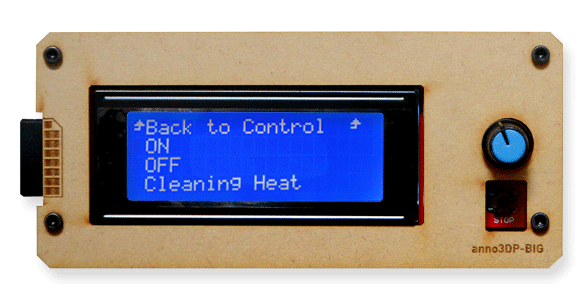
Select "Control" -> "Heater" -> "ON", the nozzle's temperature will start to increase.
Select "Control" -> "Heater" -> "ON", the nozzle's temperature will start to increase.
1.ノズルを暖める
コントローラーを操作し、"Control" -> "Heater" -> "ON"を選択します。するとステータスウインドウに戻り、ノズル温度が上がり始めます。
コントローラーを操作し、"Control" -> "Heater" -> "ON"を選択します。するとステータスウインドウに戻り、ノズル温度が上がり始めます。
2.Extrude / Retract material filament.
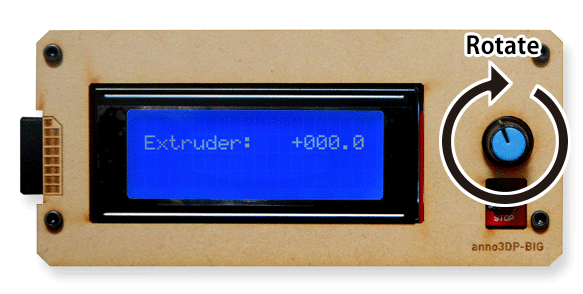
If nozzle's temperature reaches around 200 degree, you can change material filament. Select "Control" -> "Move axis" -> "Move Extruder" menu. if you rotate LCD's knob CW direction, filament will be extruded. if you rotate LCD's knob CCW direction, filament will be extracted.
Never forget to turn off nozzle heater after you finish changing filament.
If nozzle's temperature reaches around 200 degree, you can change material filament. Select "Control" -> "Move axis" -> "Move Extruder" menu. if you rotate LCD's knob CW direction, filament will be extruded. if you rotate LCD's knob CCW direction, filament will be extracted.
Never forget to turn off nozzle heater after you finish changing filament.
2.フィラメントの押し出し / 引き抜き
ノズルの温度が200度前後まで上がると、フィラメントの抜き差しが行えます。『Control』->『Move axis』->『Move Extruder』メニューを選びます。つまみを時計回りに回すと、フィラメントが押し出されます。反時計回りに回すと、フィラメントが抜き取られます。
※フィラメントの抜き差し後は、ヒーターの切り忘れにご注意ください。
ノズルの温度が200度前後まで上がると、フィラメントの抜き差しが行えます。『Control』->『Move axis』->『Move Extruder』メニューを選びます。つまみを時計回りに回すと、フィラメントが押し出されます。反時計回りに回すと、フィラメントが抜き取られます。
※フィラメントの抜き差し後は、ヒーターの切り忘れにご注意ください。
3. When you set new filament,
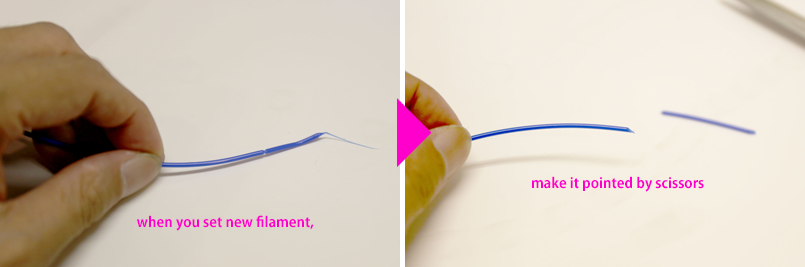
Cut the head of your filament to make it pointed, and pinch the head to make it straight.
Cut the head of your filament to make it pointed, and pinch the head to make it straight.
3. 新しいフィラメントをセットする時
新しいフィラメントをセットする時は、フィラメントの先端を斜めにカットし、指でならして先端のカールをならし、まっすぐにしてあげることで交換がしやすくなります。
新しいフィラメントをセットする時は、フィラメントの先端を斜めにカットし、指でならして先端のカールをならし、まっすぐにしてあげることで交換がしやすくなります。